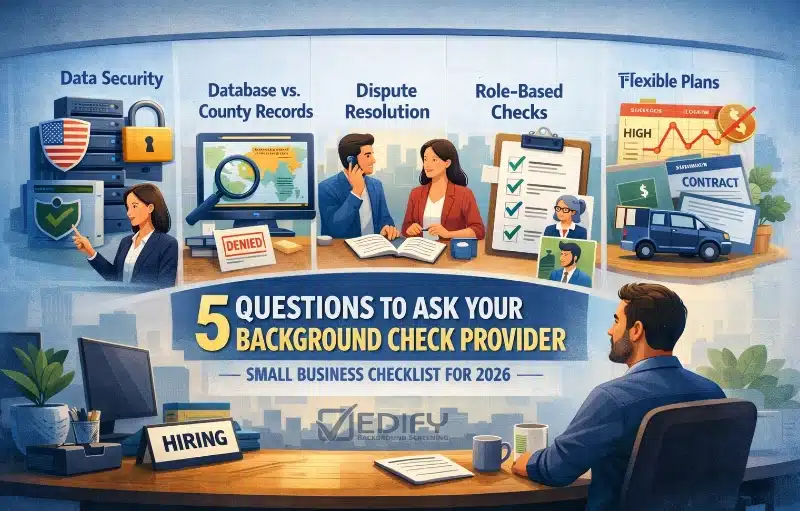
5 Questions to Ask a Background Screening Provider: Small Business Checklist (2026)
Picking a screening provider is not like picking payroll software. If a report comes back wrong, delayed, or hard to dispute, you feel it immediately in hiring speed, candidate experience, and compliance risk.
That’s why background checks should feel like a partnership, not a one-time transaction.
Use this 2026 checklist to ask the right questions before your first hire, and before you scale.
Quick Summary: What to Know in 2026
- Data handling matters: ask where your candidate data is processed and who touches it.
- Cheap checks can be shallow: database-only searches can miss recent county-level activity or require follow-up anyway.
- Disputes happen: you want real humans and a clear FCRA-ready workflow when things get messy.
- Don’t pay for bloated bundles: screen by role so you only run what you actually need.
- Flexibility wins: no monthly minimums makes sense for Small Business hiring ups and downs.
Question 1: “Where is my data being processed, and who has access to it?”
This is the trust question. Your screening provider handles sensitive candidate info, and the way they process it matters.
If pieces of the work are outsourced, offshored, or passed between teams, you can end up with more hands on the data and fewer clear answers when something goes wrong.
Practical TIP: ask your provider to explain their workflow like you’re five. Who touches the file, where they sit, and what safeguards are in place.
A good provider will answer this directly without “we can’t share that” vibes.
What to ask (copy/paste these)
- Is any part of research, support, QA, or dispute handling outsourced or offshore?
- Where are your screening specialists located?
- How do you control access to candidate data (role-based access, audit logs, training)?
- If there’s an issue, who is accountable and how do we reach them?
What a solid answer sounds like
- Clear locations (not vague “global team” language).
- Specific security controls (access rules, logging, training expectations).
- A named support path (not “submit a ticket and wait”).
Takeaway: You should know where your candidate data is processed, and you should get a straight answer in under 60 seconds.
Question 2: “What sources do you actually search, and how do you avoid the ‘database-only’ miss?”
“Nationwide” sounds great until you learn there’s no single perfect system that captures every local court update instantly.
Many low-cost checks lean heavily on broad databases. Those can help point you in a direction, but they are not always the final word for employment decisions.
Practical TIP: ask what’s included by default and what’s optional. Then ask how they validate anything that looks like a match.
You are trying to avoid two bad outcomes: missing something important, or flagging the wrong person.
What to ask
- Is your “criminal check” database-only, county-level, or a mix?
- How do you confirm potential matches before reporting them?
- Do you verify records at the originating source when needed?
- What causes delays, and how do you communicate them?
Red flags
- “Instant” is the only promise, with no explanation of data sources.
- No clear match logic (how they avoid false positives).
- No plan for follow-up when records live at the county level.
Takeaway: If a provider can’t clearly explain what “nationwide” means and what they verify, you’re buying speed, not confidence.
(Related terms: National Criminal Database Search,
County Criminal Search.)
Why this matters in 2026
A “bad hire” is rarely just a salary number. It’s your time, rehiring costs, training time, and lost productivity.
Many HR sources estimate replacement cost can land around 6 to 9 months of salary depending on the role.
(Reference: Workable’s breakdown.)
Get a Custom Quote for Your Hiring Volume
Right-size your screening by role and volume.
Question 3: “If a candidate disputes a report, can I speak to a real person?”
Disputes happen. Sometimes it’s mistaken identity. Sometimes it’s a record that got updated late. Sometimes it’s a flat-out error.
What matters most is how fast and clearly your provider supports the reinvestigation process and how well they support your compliance steps.
Practical move: ask them to walk you through a dispute scenario step-by-step.
Who answers the phone? What gets reviewed? How will you know what changed? What should you do during the waiting period?
What to ask
- Can we call and talk to a real support person, or is it ticket-only?
- What is your dispute and reinvestigation workflow?
- How do you notify us when something changes (and what documentation is provided)?
- Do you provide tools that support pre-adverse and adverse action steps?
If you want the plain-language compliance baseline for employers, the FTC’s guidance is a solid reference:
Using Consumer Reports: What Employers Need to Know.
Takeaway: When a dispute hits, you shouldn’t be stuck refreshing a ticket portal while your hiring timeline stalls.
(Related terms: Dispute and Reinvestigation, Adverse Action.)
Question 4: “Can you help me screen by role so I’m not overpaying?”
This is where Small Businesses can save real money without cutting corners.
The goal is not “run everything on everyone.” The goal is to match the screen to the risk of the role.
Practical TIP: List your top 3 to 5 job types and ask the provider to recommend packages for each.
A good provider will ask smart questions (access to money, driving, customer contact, data access) and help you build repeatable packages you can order in a click.
How to set this up in the real world
- Start with your “risk drivers”: money, vehicles, vulnerable populations, sensitive data, keys/access.
- Create 3 simple tiers: CORE, STANDARD, and HIGH-TRUST. Then map roles to tiers.
- Document the “why”: tie each package to job duties so you stay consistent.
- Review quarterly: as roles change, your packages should change too.
What to ask
- Can we create multiple screening packages by role (and update them without a hassle)?
- Can we add optional checks only when a role truly requires it?
- Will you help us keep the process consistent across hiring managers?
Takeaway: Screening by role is the fastest way to stop paying for bloated bundles while still protecting your business.
Question 5: “Are we locked into minimums, contracts, or packages that don’t fit our hiring volume?”
Small Business hiring is not predictable. Some months you hire zero people. Other months you hire five.
If your provider forces a monthly minimum or a rigid contract, you either overpay or you start skipping steps when budgets get tight.
Practical TIP: Ask for the pricing structure in writing and make sure it matches how you actually hire.
Also ask how support works when you are small. “Enterprise support” should not require enterprise volume.
What to ask
- Is there a monthly minimum, annual commitment, or platform fee?
- Do prices change based on volume, and how is that calculated?
- Can we start small and scale without rebuilding everything later?
- What support do we get, and what does “support” actually mean day-to-day?
Takeaway: Your screening program should scale with your hiring, not punish you for slow months.
(Related service: small business background checks.)
Bottom line: pick a partner you can grow with
In 2026, the best screening providers do more than “run a report.”
They help you build a repeatable process, keep you compliant, answer real questions, and customize by role so you spend smarter.
If you want a screening setup that fits your roles and your hiring volume, start here:
See our background check pricing
and request a custom quote.
FAQ
Q: Is “database-only” always bad?
A: Not always. It can be a helpful pointer, especially early in a process. The problem is when it’s treated like a complete, final answer. Next step: Ask your provider what gets verified at the originating source when something looks like a match.
Q: How long do background checks take for small businesses?
A: It depends on what you run and where records live. County-level research can take longer than a quick database search. Next step: Ask for realistic turnaround ranges by search type and how delays are communicated.
Q: What should we do if a report might affect a hiring decision?
A: Employers should follow the FCRA steps when using a consumer report in employment decisions, including the pre-adverse and adverse action process when applicable.
Q: How do we keep our hiring decisions fair and consistent?
A: Screen by role, document why each package exists, and keep decisions job-related and consistent.
The EEOC’s guidance on arrest and conviction records is a helpful reference point. EEOC guidance.
Compliance Note
- Disclosure + authorization: get proper disclosure and written authorization before ordering a consumer report for employment. (See FTC guidance.)
- Adverse action steps: if report info influences your decision, follow the pre-adverse and adverse action process and keep documentation. (See FTC – FCRA.)
- Job-related consistency: keep decisions job-related and consistent, and align policy with EEOC guidance on arrest and conviction records. (See EEOC guidance.)
This is general information, not legal advice. When in doubt, confirm with your counsel.
Related Terms
Authoritative Sources